
If you have resources in a .NET .resx or .resources file and you need them in an unmanaged project, an installer, or an RC-based build, you need a conversion step. Resource Builder does it in one command: images come out as real BITMAP, ICON, and CURSOR resources, and everything else is preserved as named RCDATA with its bytes intact.
This is the .resx/.resources to native direction. If instead you want to edit a .resx file, or diff two of them, see the guides on editing .NET resource files and comparing resources.
What the conversion produces
-conv maps each .NET entry to a native resource:
.NET Entry
Native result
Bitmap
a real BITMAP resource
Icon
a real ICON resource (a multi-size entry becomes a GROUP_ICON plus its ICON members)
Cursor
a real CURSOR resource
String, Boolean, Byte, Int16/32/64, Byte Array, or any opaque CLR type
an RCDATA resource named after the .NET entry, holding its raw bytes unchanged
Two output forms:
.resis the compiled binary resource file, ready to link..rcis a plain resource script. Every entry’s bytes are inlined as hex, so the script is completely self-contained: there are no companion image or data files to keep next to it. You can open it, read it, edit it, and compile it with any RC compiler.
Convert from the command line
The console tool is sircc64.exe. The main application, Resbldr5.exe, accepts the same -conv syntax.
Between .resx and .resources
sircc64.exe -conv Strings.resx Strings.resourcesThe direction is taken from the file extensions. Omit the output name and the opposite extension is used automatically:
sircc64.exe -conv Strings.resxTo a native .res
sircc64.exe -conv App.resx App.resThe generated script is compiled internally and only the .res is written.
To a native .rc script
sircc64.exe -conv App.resx App.rcThis writes the script itself, uncompiled. To confirm it is valid, compile it and compare:
sircc64.exe -c App.rc App-from-rc.resApp-from-rc.res is byte-identical to the .res that -conv ... App.res produces directly.
Batch conversion
Batch mode is currently supported only for converting between the two .NET formats. Point -conv at a *.resx or *.resources pattern (* and ? wildcards) and every match is converted to the opposite format in one call:
sircc64.exe -conv *.resxOutput names are auto-derived from the inputs, so an explicit output name is ignored here. Use -o <dir> to collect the results in one folder instead of writing each next to its source.
Converting to a native .res or .rc is one file at a time. Wildcards are not accepted for those targets.
Exit codes
0 success, 1 error, 2 one or more files failed in a batch run. That makes -conv safe to drop into a build script.
Convert .resx to .resources in the app
If you just need to flip a file between the two .NET formats and would rather not use the command line: open it in Resource Builder, choose File > Save As, and pick the other format from the file-type list.
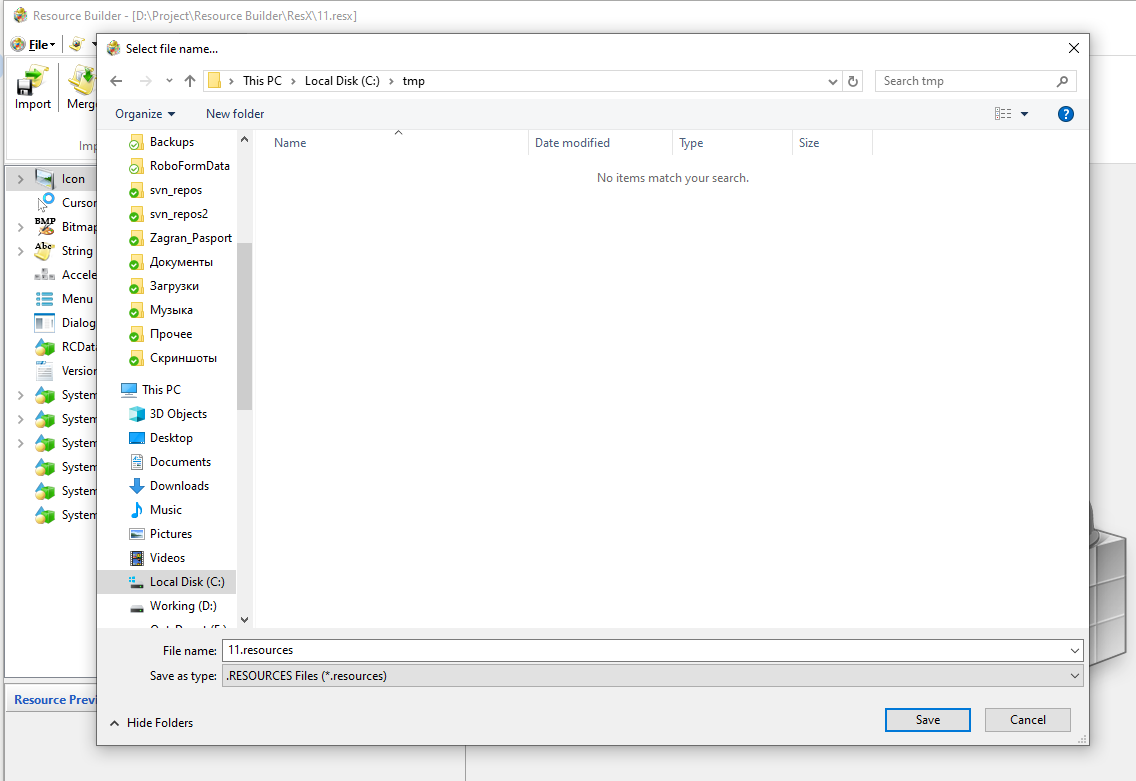
Native .res and .rc are not offered as Save As targets. For those, use -conv.
Getting .NET resources into a native project you already have open
If your goal is not a standalone file but to merge .NET resources into an existing native .rc or .res project, do it in the app instead. With the native project open, use File > Import or File > Merge and point it at the .resx/.resources file. The entries are converted and added in place, using the same mapping as -conv.
The reverse direction
-conv does not convert a native .rc, .res, .exe, or .dll into .resx/.resources. It rejects that with a clear message rather than attempting it.
You can still go native to .NET inside the app. Open a .resx/.resources project and use File > Import or File > Merge on a native source. Icon, cursor, and bitmap resources become real .NET entries, STRINGTABLE bundles are unpacked into individual .NET String entries named after each string’s #define, and other types (RCDATA, version info, manifest) are carried through as opaque byte arrays. Menu, dialog, and accelerator resources have no .NET equivalent and are skipped, with a count reported at the end.
Things to know
- Native resource names are uppercase and case-insensitive. Two .NET entries whose names differ only in case will collide once converted. Rename one first if that applies to your file.
- A .rc is larger than the binary. Because every entry's bytes are inlined as hex text, expect the script to be roughly three times the size of the equivalent .res.
- The .rc is self-contained. No sidecar files, so it is safe to commit on its own or hand to another team.
Try it
Resource Builder is a commercial tool with a free 30-day trial. Download it from the Download page and run sircc64.exe -conv yourfile.resx yourfile.rc to see the script it generates.